> ## Documentation Index
> Fetch the complete documentation index at: https://docs.awaitio.com/llms.txt
> Use this file to discover all available pages before exploring further.
# Pages and layouts
> A folder can show its own content, such as tables and totals, next to its actions.
A folder's `index.ts` can export a page instead of an action, see [Routing](/core/routing). The folder then shows its subfolders and actions in a column on the left and the page on the right. A page puts **display components** (a table, tiles…) into a **layout**. It only displays, so there is no form and no Continue button.
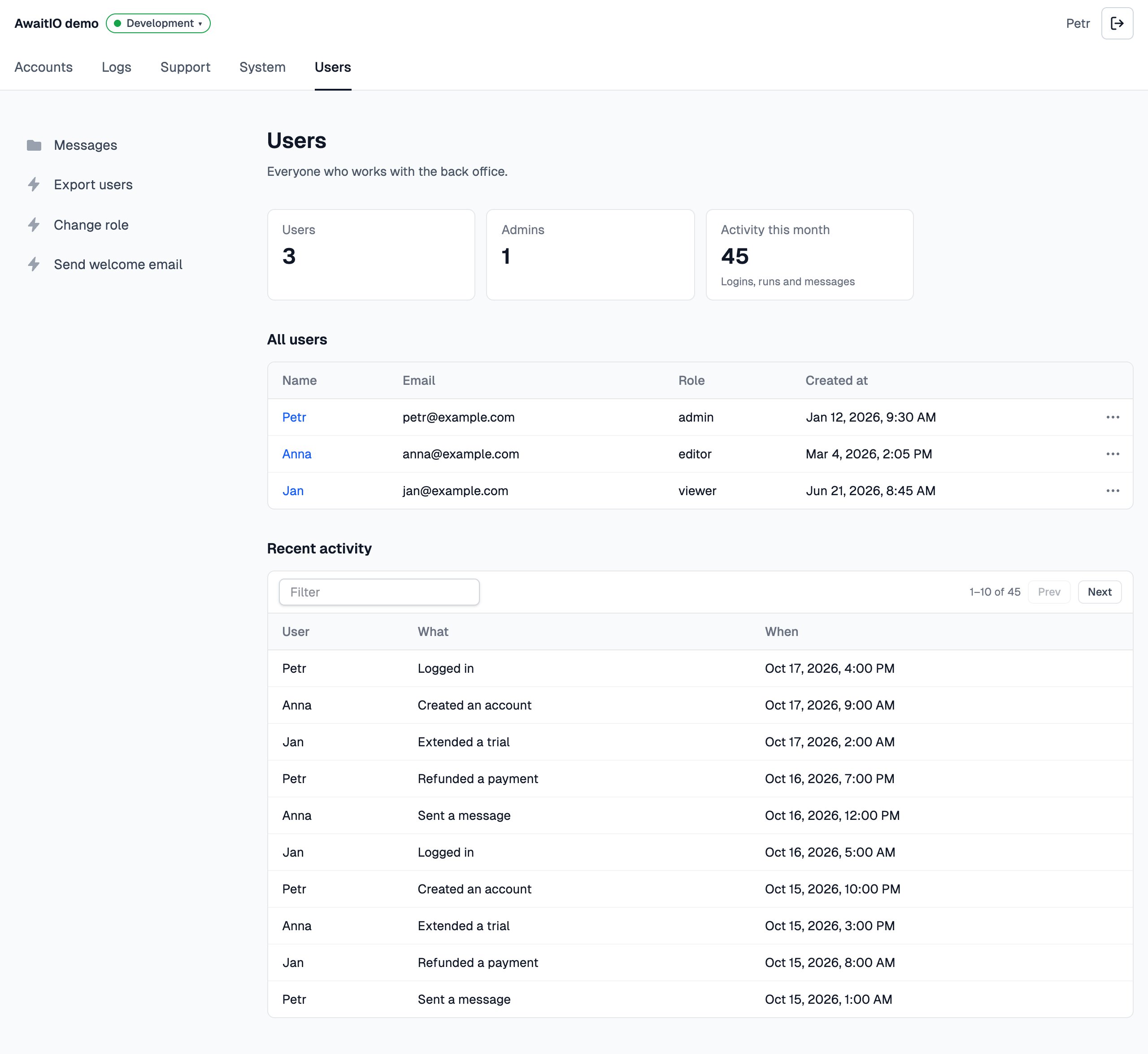 A page needs the display components it shows registered in `components`, see [Display components](/core/display-components), and a layout to put them in, see [Layouts](#layouts).
## Write a page
Export `app.definePage()` from the folder's `index.ts`. The handler returns a layout with the display components in it:
```ts actions/users/index.ts theme={null}
import { app } from '../../app';
export const usersPage = app.definePage({
description: 'Everyone who can be messaged.',
handler: async ({ io, ctx }) => {
const users = await prisma.user.findMany();
return io.layout.basic({
title: 'Users',
children: [io.display.metadata(null, { items: [{ label: 'Users', value: users.length }] }), io.display.table('All users', { data: users, columns: ['name', 'email'] })],
});
},
});
```
* Every display component takes a label, shown as the heading above it (`null` for none), and its props.
* Returning just the array, `return [io.display.table(…)]`, puts it into the layout registered as `basic`.
* Props are typed by each component's schema, and the server checks them again before they reach the browser: props that do not fit show an error instead of the page.
* The handler runs every time someone opens the folder; nothing is kept between visits.
* The handler gets `ctx` like an action: [`ctx.user`](/ctx/user) is who opened the page and `ctx.params` the query string of the link (`/groups/users?role=admin`). `ctx.page.slug` is the folder the page stands for: `users`.
* `app.definePage()` belongs only in a folder's `index.ts`; anywhere else it stops the app at start.
* Its const ends in `Page`, `usersPage`, as an action's ends in `Action`; the file stays `index.ts`.
## Layouts
The handler returns the display components inside a layout, the frame that places them. Every layout is a package registered in `layouts`, the basic one too:
```ts app.ts {5} theme={null}
import { layoutBasic } from '@awaitio/layout-basic';
export const app = new AwaitIO({
// name, actionsDirectory, theme, secret, users, components…
layouts: { basic: layoutBasic },
});
```
See [Layout components](/core/layout-components) for the layouts there are and how to write your own.
This documentation is built and hosted on [Mintlify](https://mintlify.com), a developer documentation platform.
A page needs the display components it shows registered in `components`, see [Display components](/core/display-components), and a layout to put them in, see [Layouts](#layouts).
## Write a page
Export `app.definePage()` from the folder's `index.ts`. The handler returns a layout with the display components in it:
```ts actions/users/index.ts theme={null}
import { app } from '../../app';
export const usersPage = app.definePage({
description: 'Everyone who can be messaged.',
handler: async ({ io, ctx }) => {
const users = await prisma.user.findMany();
return io.layout.basic({
title: 'Users',
children: [io.display.metadata(null, { items: [{ label: 'Users', value: users.length }] }), io.display.table('All users', { data: users, columns: ['name', 'email'] })],
});
},
});
```
* Every display component takes a label, shown as the heading above it (`null` for none), and its props.
* Returning just the array, `return [io.display.table(…)]`, puts it into the layout registered as `basic`.
* Props are typed by each component's schema, and the server checks them again before they reach the browser: props that do not fit show an error instead of the page.
* The handler runs every time someone opens the folder; nothing is kept between visits.
* The handler gets `ctx` like an action: [`ctx.user`](/ctx/user) is who opened the page and `ctx.params` the query string of the link (`/groups/users?role=admin`). `ctx.page.slug` is the folder the page stands for: `users`.
* `app.definePage()` belongs only in a folder's `index.ts`; anywhere else it stops the app at start.
* Its const ends in `Page`, `usersPage`, as an action's ends in `Action`; the file stays `index.ts`.
## Layouts
The handler returns the display components inside a layout, the frame that places them. Every layout is a package registered in `layouts`, the basic one too:
```ts app.ts {5} theme={null}
import { layoutBasic } from '@awaitio/layout-basic';
export const app = new AwaitIO({
// name, actionsDirectory, theme, secret, users, components…
layouts: { basic: layoutBasic },
});
```
See [Layout components](/core/layout-components) for the layouts there are and how to write your own.
This documentation is built and hosted on [Mintlify](https://mintlify.com), a developer documentation platform.