> ## Documentation Index
> Fetch the complete documentation index at: https://docs.awaitio.com/llms.txt
> Use this file to discover all available pages before exploring further.
# Routing
> The actions folder is the navigation: every file is an action, its path is the URL.
AwaitIO has no route table. You pass a folder to `new AwaitIO()` as `actionsDirectory` and every file in it becomes an action, with its path as the URL and its folders as the navigation.
```ts app.ts theme={null}
import { join } from 'path';
export const app = new AwaitIO({
name: 'Internal tools',
actionsDirectory: join(__dirname, 'actions'),
// theme, secret, users, components…
});
```
## Two ways to lay it out
Start flat and sort the actions into folders once the list gets long. Moving a file changes its URL, so links to it change too.
### Minimal setup without folders
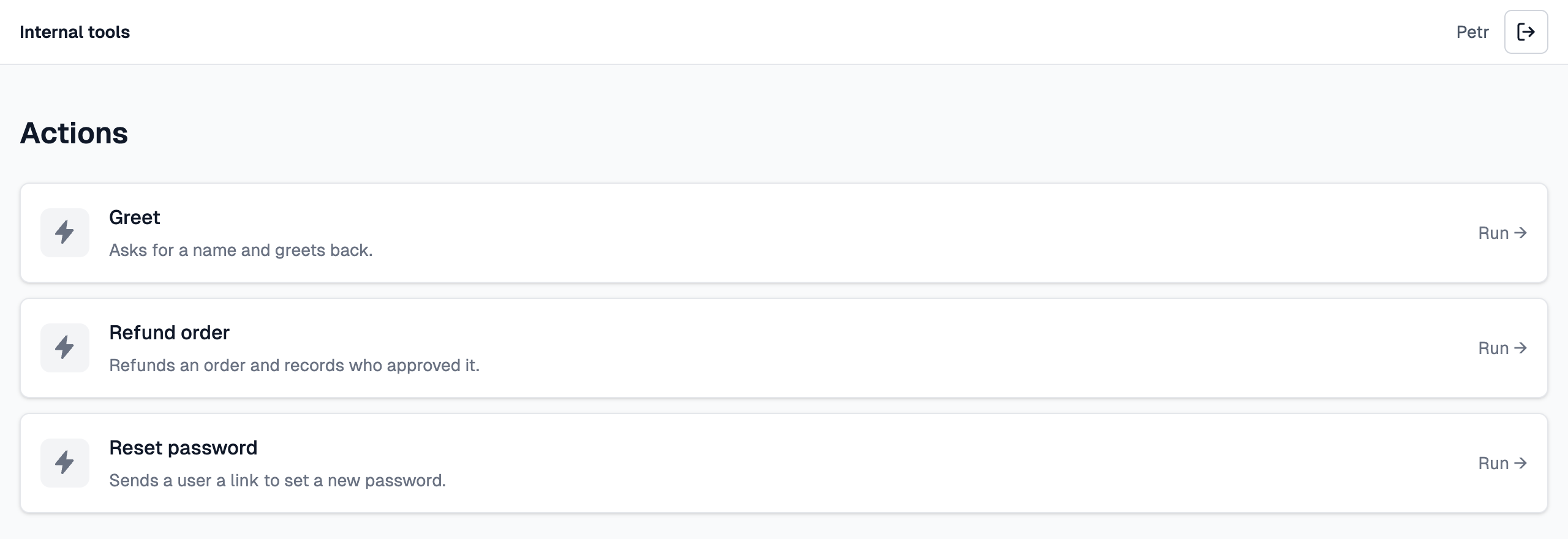
Every action sits directly in `actions/`, as in the [Quickstart](/quickstart):
```text theme={null}
actions/
├── greet.ts → /actions/greet
├── refundOrder.ts → /actions/refund_order
└── resetPassword.ts → /actions/reset_password
```
The home page lists them as cards, without tabs. Enough for a handful of tools.
 ### Folders with tabs and a file browser
Put the actions into folders and the folders become the navigation:
### Folders with tabs and a file browser
Put the actions into folders and the folders become the navigation:
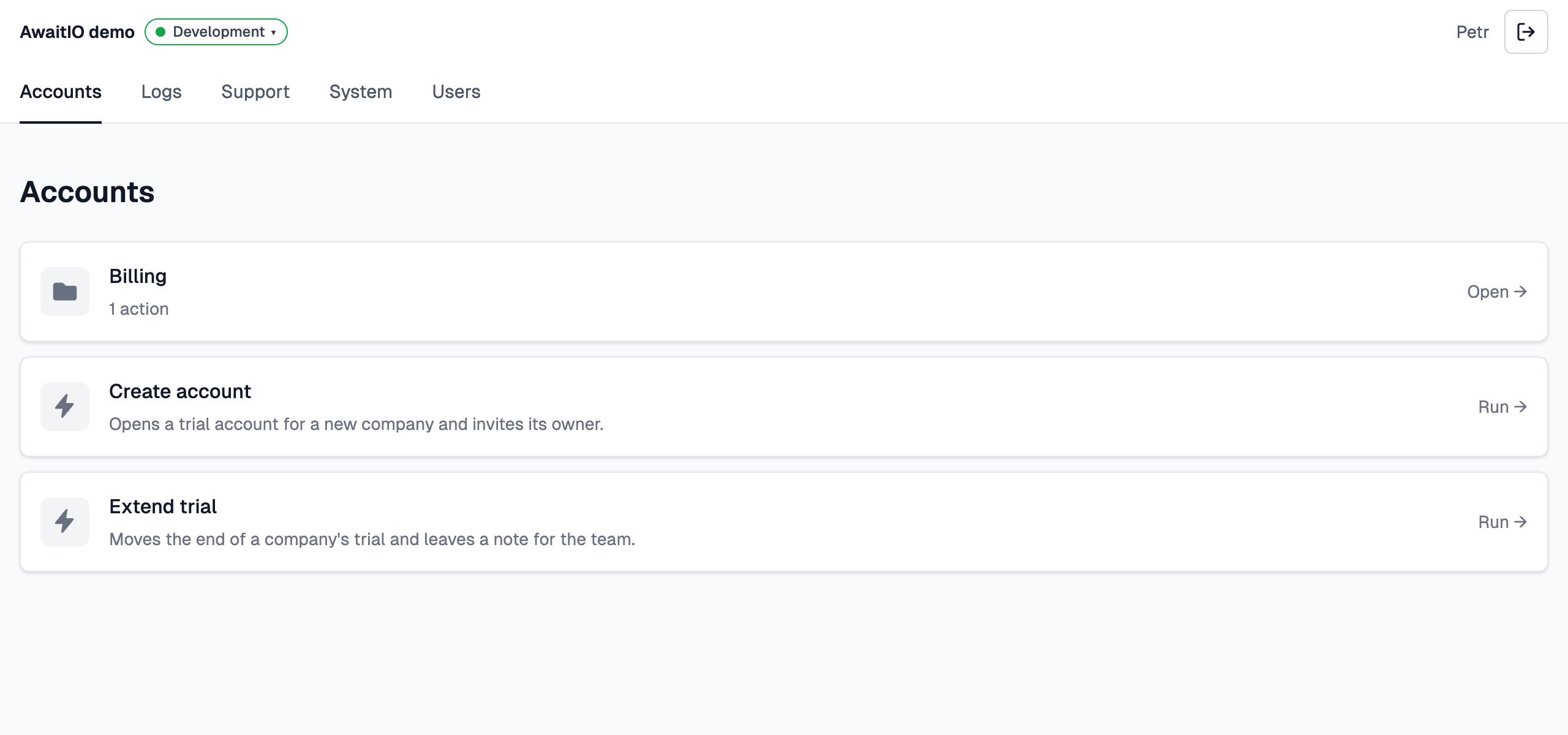 * **Top-level folders are tabs.** Each folder directly in `actions/` becomes a tab in the second row of the header (*Accounts*, *Logs*, *Support*, *System*, *Users*) at `/groups/`, e.g. `/groups/accounts`. There is no tab with everything: `/` opens the first tab.
* **A folder shows only what is directly in it**, like a file browser: its subfolders as cards first, then its own actions. Open a subfolder card to see what is inside: `/groups/accounts/billing`. A folder with a page (see below) lists them in a column on the left instead and shows the page next to them.
* **Breadcrumbs.** Inside a subfolder and above an action, *← Actions › Accounts › Billing* links back to each folder. Leaving a run that is still going cancels it.
## The path is the URL
The slug of an action is its path in the folder, each part in snake\_case. This is the demo app in folders, each file with its URL:
```text theme={null}
actions/
├── accounts/
│ ├── createAccount.ts → /actions/accounts/create_account
│ ├── extendTrial.ts → /actions/accounts/extend_trial
│ └── billing/
│ └── refundPayment.ts → /actions/accounts/billing/refund_payment
├── logs/
│ └── searchLogs.ts → /actions/logs/search_logs
├── support/
│ └── rateSupportCall.ts → /actions/support/rate_support_call
├── system/
│ └── clearCache.ts → /actions/system/clear_cache
└── users/
├── index.ts → /groups/users (a page)
├── changeRole.ts → /actions/users/change_role
├── exportUsers.ts → /actions/users/export_users
├── sendWelcomeEmail.ts → /actions/users/send_welcome_email
└── messages/
└── sendMessage.ts → /actions/users/messages/send_message
```
* `createAccount.ts`, `create_account.ts` and `create-account.ts` all give the slug `create_account`, and folders follow the same rule. Two files that end up with the same slug stop the app at start.
* Folders go as deep as you need.
* The handler reads the slug as `ctx.action.slug`: `accounts/create_account`.
* The list shows names, not paths: the URL is what you link to, not something people read.
## One file, one action
Each file exports one `app.action(...)`, as a named or a default export:
```ts actions/accounts/createAccount.ts theme={null}
import { app } from '../../app';
export const createAccount = app.action({
name: 'Create account',
handler: async (io) => {
const company = await io.input.text('Company name');
return `${company} has an account.`;
},
});
```
A file that exports no action, or more than one, stops the app at start with an error naming the file. Action files import `app` for their typed `io`, so keep `new AwaitIO()` in its own `app.ts`; AwaitIO imports the action files itself.
**Skipped:** files and folders whose name starts with `_` or `.`, `*.test.ts`, `*.spec.ts` and `*.d.ts`. Put helpers that are not actions in a folder like `actions/_shared/`, or outside the actions folder.
## index.ts is the folder
`index.ts` stands for its folder. It can export either:
* **a page** with `app.page()`: the folder then shows its subfolders and actions in a column on the left and the page on the right, such as a table of all users. In the demo, `users/index.ts` is one.
* **an action** with `app.action()`: it gets the folder's slug (`billing/index.ts` is at `/actions/billing`) and leads the folder's actions.
The top level of `actions/` has no index file; an `index.ts` there stops the app at start.
## Names and order
* **Every action needs a `name`**: the action list and the run page show it. An action without one stops the app at start.
* **Folders are named after themselves**, in words: `billing` reads *Billing*, `auditLogs` and `audit_logs` both read *Audit logs*.
* **The order** is alphabetical by file name. In the list, a folder's subfolders come before its actions, and its `index.ts` leads the actions.
## URLs of a run
| URL | What it shows |
| - | - |
| `/` | The list of actions, or the first tab when there are folders. |
| `/groups/` | One folder: its subfolders and its own actions. |
| `/actions/` | Starts a new run of the action. |
| `/actions//` | One run, its current step or its result. Only the user who started it can open it. |
| `/actions/?id=42` | Starts a run with `ctx.params` `{ id: '42' }`. |
## When you compile
AwaitIO loads the action files when `listen()` runs, so the folder must exist next to the compiled server with the compiled files in it. `tsc` keeps the layout; a bundler that produces a single file drops it.
This documentation is built and hosted on [Mintlify](https://mintlify.com), a developer documentation platform.
* **Top-level folders are tabs.** Each folder directly in `actions/` becomes a tab in the second row of the header (*Accounts*, *Logs*, *Support*, *System*, *Users*) at `/groups/`, e.g. `/groups/accounts`. There is no tab with everything: `/` opens the first tab.
* **A folder shows only what is directly in it**, like a file browser: its subfolders as cards first, then its own actions. Open a subfolder card to see what is inside: `/groups/accounts/billing`. A folder with a page (see below) lists them in a column on the left instead and shows the page next to them.
* **Breadcrumbs.** Inside a subfolder and above an action, *← Actions › Accounts › Billing* links back to each folder. Leaving a run that is still going cancels it.
## The path is the URL
The slug of an action is its path in the folder, each part in snake\_case. This is the demo app in folders, each file with its URL:
```text theme={null}
actions/
├── accounts/
│ ├── createAccount.ts → /actions/accounts/create_account
│ ├── extendTrial.ts → /actions/accounts/extend_trial
│ └── billing/
│ └── refundPayment.ts → /actions/accounts/billing/refund_payment
├── logs/
│ └── searchLogs.ts → /actions/logs/search_logs
├── support/
│ └── rateSupportCall.ts → /actions/support/rate_support_call
├── system/
│ └── clearCache.ts → /actions/system/clear_cache
└── users/
├── index.ts → /groups/users (a page)
├── changeRole.ts → /actions/users/change_role
├── exportUsers.ts → /actions/users/export_users
├── sendWelcomeEmail.ts → /actions/users/send_welcome_email
└── messages/
└── sendMessage.ts → /actions/users/messages/send_message
```
* `createAccount.ts`, `create_account.ts` and `create-account.ts` all give the slug `create_account`, and folders follow the same rule. Two files that end up with the same slug stop the app at start.
* Folders go as deep as you need.
* The handler reads the slug as `ctx.action.slug`: `accounts/create_account`.
* The list shows names, not paths: the URL is what you link to, not something people read.
## One file, one action
Each file exports one `app.action(...)`, as a named or a default export:
```ts actions/accounts/createAccount.ts theme={null}
import { app } from '../../app';
export const createAccount = app.action({
name: 'Create account',
handler: async (io) => {
const company = await io.input.text('Company name');
return `${company} has an account.`;
},
});
```
A file that exports no action, or more than one, stops the app at start with an error naming the file. Action files import `app` for their typed `io`, so keep `new AwaitIO()` in its own `app.ts`; AwaitIO imports the action files itself.
**Skipped:** files and folders whose name starts with `_` or `.`, `*.test.ts`, `*.spec.ts` and `*.d.ts`. Put helpers that are not actions in a folder like `actions/_shared/`, or outside the actions folder.
## index.ts is the folder
`index.ts` stands for its folder. It can export either:
* **a page** with `app.page()`: the folder then shows its subfolders and actions in a column on the left and the page on the right, such as a table of all users. In the demo, `users/index.ts` is one.
* **an action** with `app.action()`: it gets the folder's slug (`billing/index.ts` is at `/actions/billing`) and leads the folder's actions.
The top level of `actions/` has no index file; an `index.ts` there stops the app at start.
## Names and order
* **Every action needs a `name`**: the action list and the run page show it. An action without one stops the app at start.
* **Folders are named after themselves**, in words: `billing` reads *Billing*, `auditLogs` and `audit_logs` both read *Audit logs*.
* **The order** is alphabetical by file name. In the list, a folder's subfolders come before its actions, and its `index.ts` leads the actions.
## URLs of a run
| URL | What it shows |
| - | - |
| `/` | The list of actions, or the first tab when there are folders. |
| `/groups/` | One folder: its subfolders and its own actions. |
| `/actions/` | Starts a new run of the action. |
| `/actions//` | One run, its current step or its result. Only the user who started it can open it. |
| `/actions/?id=42` | Starts a run with `ctx.params` `{ id: '42' }`. |
## When you compile
AwaitIO loads the action files when `listen()` runs, so the folder must exist next to the compiled server with the compiled files in it. `tsc` keeps the layout; a bundler that produces a single file drops it.
This documentation is built and hosted on [Mintlify](https://mintlify.com), a developer documentation platform.