> ## Documentation Index
> Fetch the complete documentation index at: https://docs.awaitio.com/llms.txt
> Use this file to discover all available pages before exploring further.
# Display Table
> Shows rows, with filter, paging, links and row menus.
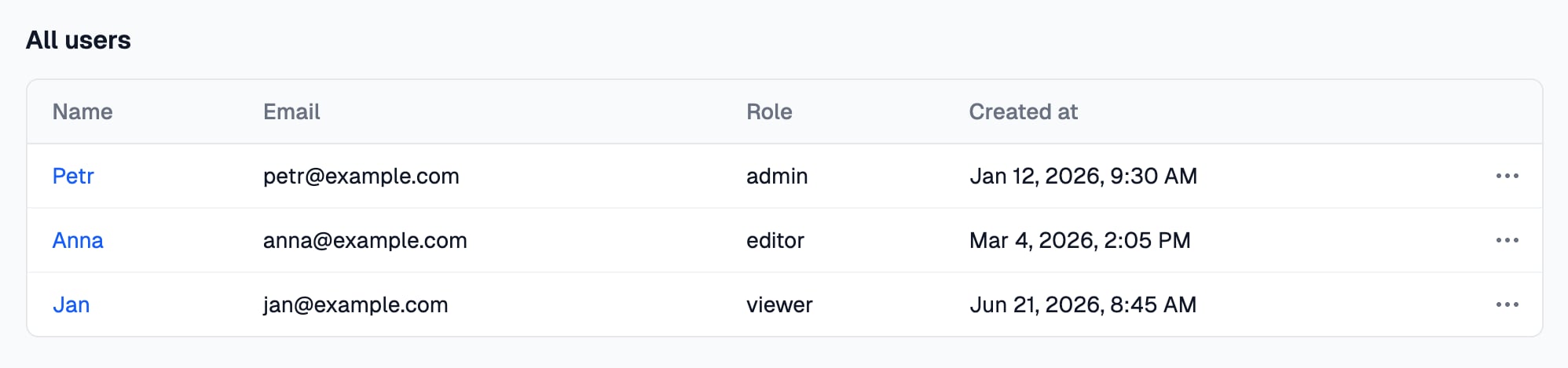
`io.display.table()` shows records as a table in a [page](/core/pages) or in a step of an action. It only displays and returns nothing. Provided by the `@awaitio/display-table` package.
 ## Install
```bash theme={null}
npm install @awaitio/display-table
```
## Setup
Register it under the key you want in `io`, see [Display components](/core/display-components):
```ts app.ts {5} theme={null}
import { displayTable } from '@awaitio/display-table';
export const app = new AwaitIO({
// name, actionsDirectory, theme, secret, users…
components: { display: { table: displayTable } },
});
```
## Usage
```ts theme={null}
io.display.table('All users', {
data: await prisma.user.findMany({ include: { account: true } }),
columns: [
{ label: 'Name', renderCell: (row) => ({ label: row.name, route: sendWelcomeEmailAction.route({ params: { name: row.name } }) }) },
{ label: 'Email', accessorKey: 'email' },
{ label: 'Account', renderCell: (row) => row.account.name },
'createdAt',
],
rowMenuItems: (row) => [changeRoleAction.route({ params: { id: row.id } })],
});
```
The label is the heading above the table; pass `null` for none. `row` has the type of the records in `data`, so a typo in `accessorKey` or in `row.account.name` is a type error.
## Props
| Prop | Type | Required | Description |
| - | - | - | - |
| `data` | `TRow[]` | Required | The records, e.g. straight from the database. None is fine. |
| `columns` | `(key \| { label, accessorKey?, renderCell? })[]` | Required | The columns, see [Columns](#columns). Required, as an empty table has no records to read. |
| `rowMenuItems` | `(row) => ActionRoute[]` | Optional | The links in the *…* menu at the end of a row, see [Row menu](#row-menu). |
| `pageSize` | `number` | Optional | Rows per page. Defaults to 20; the pager shows only when there are more. |
| `filterable` | `boolean` | Optional | Shows the filter above the table. Defaults to `true`. |
| `emptyText` | `string` | Optional | Shown when there are no rows. Defaults to *Nothing to show.* |
The records stay on the server: the browser gets only the finished cells and menus. Filtering and paging happen in the browser, on the rows the page sent, so send the rows people need, not the whole table.
## Columns
A column is written as in Interval:
* `'email'`: the record's `email`, headed *email*.
* `{ label: 'Email', accessorKey: 'email' }`: the same with your own heading.
* `{ label: 'Account', renderCell: (row) => row.account.name }`: anything built from the whole record.
`renderCell` runs on the server, once per row. It returns a plain value or a cell object:
| Cell | Shows |
| - | - |
| `{ label, highlightColor }` | The label in a colored badge. |
| `{ label, url }` | A link to a page outside AwaitIO, opened in a new tab. |
| `{ label, route }` | A link to an action, `route` from [`action.route()`](/ctx/redirect). |
They can be combined, e.g. a colored label that links to an action:
```ts theme={null}
io.display.table('Devices', {
data: devices,
columns: [
'name',
{ label: 'Status', renderCell: (device) => ({ label: device.isOnline ? 'Online' : 'Offline', highlightColor: device.isOnline ? 'green' : 'red' }) },
{ label: 'Dashboard', renderCell: (device) => ({ label: 'Open', url: `https://grafana.example.com/d/${device.id}` }) },
{ label: 'Account', renderCell: (device) => ({ label: device.account.name, route: accountDetailAction.route({ params: { id: device.account.id } }) }) },
],
});
```
## Install
```bash theme={null}
npm install @awaitio/display-table
```
## Setup
Register it under the key you want in `io`, see [Display components](/core/display-components):
```ts app.ts {5} theme={null}
import { displayTable } from '@awaitio/display-table';
export const app = new AwaitIO({
// name, actionsDirectory, theme, secret, users…
components: { display: { table: displayTable } },
});
```
## Usage
```ts theme={null}
io.display.table('All users', {
data: await prisma.user.findMany({ include: { account: true } }),
columns: [
{ label: 'Name', renderCell: (row) => ({ label: row.name, route: sendWelcomeEmailAction.route({ params: { name: row.name } }) }) },
{ label: 'Email', accessorKey: 'email' },
{ label: 'Account', renderCell: (row) => row.account.name },
'createdAt',
],
rowMenuItems: (row) => [changeRoleAction.route({ params: { id: row.id } })],
});
```
The label is the heading above the table; pass `null` for none. `row` has the type of the records in `data`, so a typo in `accessorKey` or in `row.account.name` is a type error.
## Props
| Prop | Type | Required | Description |
| - | - | - | - |
| `data` | `TRow[]` | Required | The records, e.g. straight from the database. None is fine. |
| `columns` | `(key \| { label, accessorKey?, renderCell? })[]` | Required | The columns, see [Columns](#columns). Required, as an empty table has no records to read. |
| `rowMenuItems` | `(row) => ActionRoute[]` | Optional | The links in the *…* menu at the end of a row, see [Row menu](#row-menu). |
| `pageSize` | `number` | Optional | Rows per page. Defaults to 20; the pager shows only when there are more. |
| `filterable` | `boolean` | Optional | Shows the filter above the table. Defaults to `true`. |
| `emptyText` | `string` | Optional | Shown when there are no rows. Defaults to *Nothing to show.* |
The records stay on the server: the browser gets only the finished cells and menus. Filtering and paging happen in the browser, on the rows the page sent, so send the rows people need, not the whole table.
## Columns
A column is written as in Interval:
* `'email'`: the record's `email`, headed *email*.
* `{ label: 'Email', accessorKey: 'email' }`: the same with your own heading.
* `{ label: 'Account', renderCell: (row) => row.account.name }`: anything built from the whole record.
`renderCell` runs on the server, once per row. It returns a plain value or a cell object:
| Cell | Shows |
| - | - |
| `{ label, highlightColor }` | The label in a colored badge. |
| `{ label, url }` | A link to a page outside AwaitIO, opened in a new tab. |
| `{ label, route }` | A link to an action, `route` from [`action.route()`](/ctx/redirect). |
They can be combined, e.g. a colored label that links to an action:
```ts theme={null}
io.display.table('Devices', {
data: devices,
columns: [
'name',
{ label: 'Status', renderCell: (device) => ({ label: device.isOnline ? 'Online' : 'Offline', highlightColor: device.isOnline ? 'green' : 'red' }) },
{ label: 'Dashboard', renderCell: (device) => ({ label: 'Open', url: `https://grafana.example.com/d/${device.id}` }) },
{ label: 'Account', renderCell: (device) => ({ label: device.account.name, route: accountDetailAction.route({ params: { id: device.account.id } }) }) },
],
});
```
 * `highlightColor` is one of `red`, `orange`, `yellow`, `green`, `blue`, `purple`, `pink` and `gray`.
* The filter searches the label. With both `url` and `route`, the `url` wins.
* A `renderCell` that throws, an unknown color or a `url` that is not a full address fails like any other props that do not fit: the page shows an error, and an action fails at that step.
## Row menu
`rowMenuItems` gets each record and returns the links of its *…* menu, routes from `action.route()`: the same routes [`ctx.redirect()`](/ctx/redirect) takes, labelled with the action's name unless you pass one. An empty array leaves the row without a menu:
```ts theme={null}
io.display.table('Versions', {
data: versions,
columns: ['name', 'createdAt'],
rowMenuItems: (row) => {
return row.isActive && module.frozenAt
? [unfreezeModuleAction.route({ params: { id: module.id }, label: 'Unfreeze' })]
: [freezeToVersionAction.route({ params: { id: module.id, versionId: row.id }, label: 'Freeze to this version' })];
},
});
```
It runs on the server, once per row, like `renderCell`; a function that throws or returns something that is not a link fails the same way.
## How values look
Dates read like *Oct 16, 2026, 9:30 AM* (a `Date` from the database arrives as an ISO string and is formatted too), numbers get thousands separators, `true` and `false` read *Yes* and *No*, an empty value *N/A*, a cell object its label and any other object its JSON.
This documentation is built and hosted on [Mintlify](https://mintlify.com), a developer documentation platform.
* `highlightColor` is one of `red`, `orange`, `yellow`, `green`, `blue`, `purple`, `pink` and `gray`.
* The filter searches the label. With both `url` and `route`, the `url` wins.
* A `renderCell` that throws, an unknown color or a `url` that is not a full address fails like any other props that do not fit: the page shows an error, and an action fails at that step.
## Row menu
`rowMenuItems` gets each record and returns the links of its *…* menu, routes from `action.route()`: the same routes [`ctx.redirect()`](/ctx/redirect) takes, labelled with the action's name unless you pass one. An empty array leaves the row without a menu:
```ts theme={null}
io.display.table('Versions', {
data: versions,
columns: ['name', 'createdAt'],
rowMenuItems: (row) => {
return row.isActive && module.frozenAt
? [unfreezeModuleAction.route({ params: { id: module.id }, label: 'Unfreeze' })]
: [freezeToVersionAction.route({ params: { id: module.id, versionId: row.id }, label: 'Freeze to this version' })];
},
});
```
It runs on the server, once per row, like `renderCell`; a function that throws or returns something that is not a link fails the same way.
## How values look
Dates read like *Oct 16, 2026, 9:30 AM* (a `Date` from the database arrives as an ISO string and is formatted too), numbers get thousands separators, `true` and `false` read *Yes* and *No*, an empty value *N/A*, a cell object its label and any other object its JSON.
This documentation is built and hosted on [Mintlify](https://mintlify.com), a developer documentation platform.