> ## Documentation Index
> Fetch the complete documentation index at: https://docs.awaitio.com/llms.txt
> Use this file to discover all available pages before exploring further.
# io.group
> Asks for several values on one screen.
`io.group` puts several io calls on one form. The person fills them in and presses **Continue** once, and the handler gets all the values together.
## Usage
```ts theme={null}
import { DateTime } from 'luxon';
const { company, endsAt, note } = await io.group({
company: io.input.text('Company name', { placeholder: 'Acme Inc.' }),
endsAt: io.input.datetime('Trial ends at', { defaultValue: DateTime.now().plus({ days: 14 }).startOf('day') }),
note: io.input.textarea('Note for the team', { lines: 5 }),
});
```
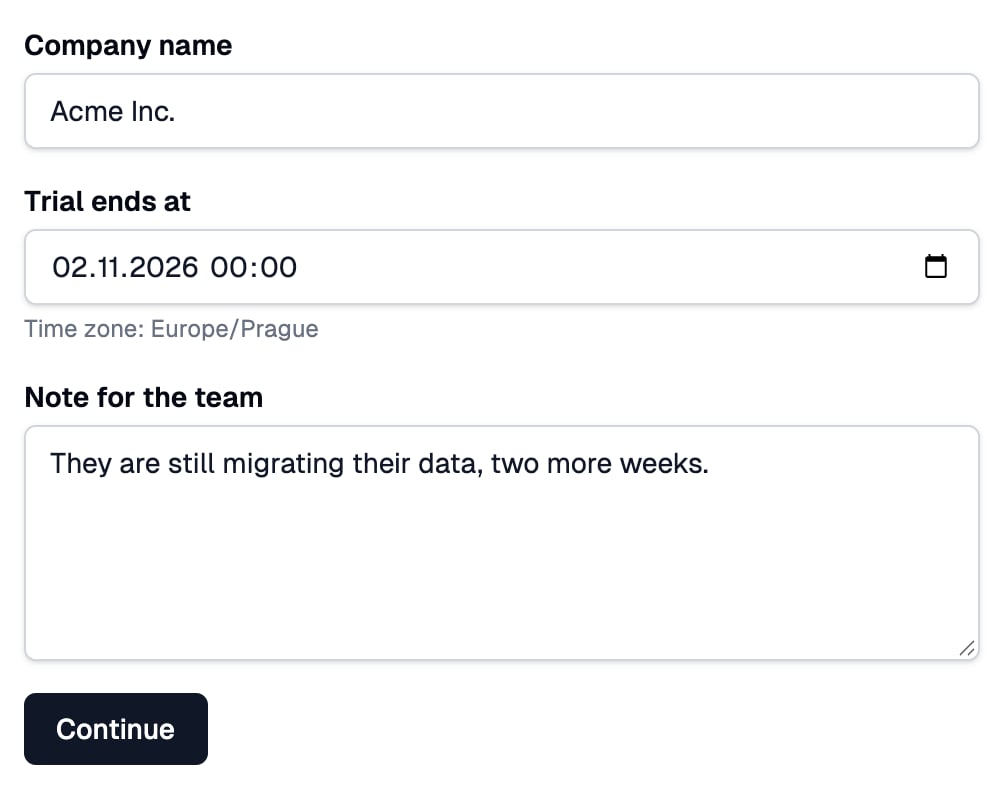 Pass the io calls without `await`: an io call does nothing until it is awaited, so inside `io.group` it only describes its field. The fields appear in the order of the object's keys.
## Arguments
| Argument | Type | Description |
| - | - | - |
| `fields` | `Record` | An object of io calls. Only an object is accepted, not an array. |
## Returns
An object with the same keys, each holding the value its io call returns, typed per key. In the example above, `company` and `note` are `string` and `endsAt` is a luxon `DateTime`.
## Built-in validation
Every field is checked on the server when the form is sent, and all errors come back at once, each shown under its own field. The handler continues only when every field is valid. An empty object (`io.group({})`) shows just the **Continue** button.
## Custom validation
For a check across fields, chain `.validate()` to the group. The function gets the values as the handler would get them and returns a message, or nothing when they are fine. The message shows above **Continue**, not under one field:
```ts theme={null}
const { startsAt, endsAt } = await io
.group({
code: io.input.text('Discount code'),
startsAt: io.input.date('Starts on'),
endsAt: io.input.date('Ends on'),
})
.validate(({ startsAt, endsAt }) => {
return endsAt > startsAt ? undefined : 'The code must end after it starts.';
});
```
Pass the io calls without `await`: an io call does nothing until it is awaited, so inside `io.group` it only describes its field. The fields appear in the order of the object's keys.
## Arguments
| Argument | Type | Description |
| - | - | - |
| `fields` | `Record` | An object of io calls. Only an object is accepted, not an array. |
## Returns
An object with the same keys, each holding the value its io call returns, typed per key. In the example above, `company` and `note` are `string` and `endsAt` is a luxon `DateTime`.
## Built-in validation
Every field is checked on the server when the form is sent, and all errors come back at once, each shown under its own field. The handler continues only when every field is valid. An empty object (`io.group({})`) shows just the **Continue** button.
## Custom validation
For a check across fields, chain `.validate()` to the group. The function gets the values as the handler would get them and returns a message, or nothing when they are fine. The message shows above **Continue**, not under one field:
```ts theme={null}
const { startsAt, endsAt } = await io
.group({
code: io.input.text('Discount code'),
startsAt: io.input.date('Starts on'),
endsAt: io.input.date('Ends on'),
})
.validate(({ startsAt, endsAt }) => {
return endsAt > startsAt ? undefined : 'The code must end after it starts.';
});
```
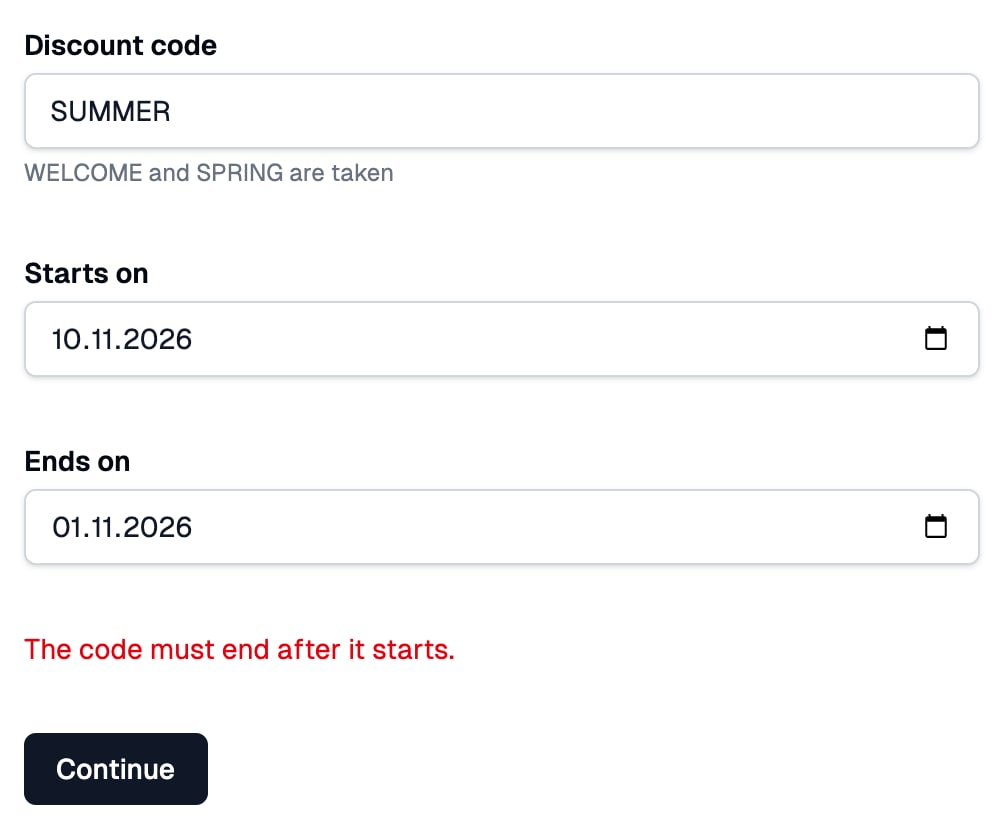 It runs on the server, may be async, and runs only once every field passed its own checks, including the [`.validate()` of a single field](/core/input-components#custom-validation).
`io.group` itself is part of `awaitio` and needs no registration; the fields inside it use the components you registered in [`components`](/core/input-components).
This documentation is built and hosted on [Mintlify](https://mintlify.com), a developer documentation platform.
It runs on the server, may be async, and runs only once every field passed its own checks, including the [`.validate()` of a single field](/core/input-components#custom-validation).
`io.group` itself is part of `awaitio` and needs no registration; the fields inside it use the components you registered in [`components`](/core/input-components).
This documentation is built and hosted on [Mintlify](https://mintlify.com), a developer documentation platform.