> ## Documentation Index
> Fetch the complete documentation index at: https://docs.awaitio.com/llms.txt
> Use this file to discover all available pages before exploring further.
# Input Number
> Asks for a number, with optional limits and decimal places.
`io.input.number()` requests a number. Provided by the `@awaitio/input-number` package.
## Install
```bash theme={null}
npm install @awaitio/input-number
```
## Setup
Register it under the key you want in `io`, see [Input components](/core/components):
```ts app.ts {5} theme={null}
import { inputNumber } from '@awaitio/input-number';
export const app = new AwaitIO({
// name, actionsDirectory, theme, secret, users…
components: { input: { number: inputNumber } },
});
```
## Usage
```ts theme={null}
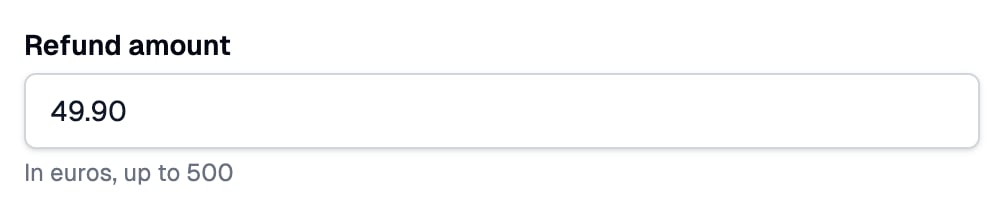
const amount = await io.input.number('Refund amount', {
min: 0,
max: 500,
decimals: 2,
helpText: 'In euros, up to 500',
});
```
## Props
| Prop | Type | Required | Description |
| - | - | - | - |
| `placeholder` | `string` | Optional | Text shown in the empty field. |
| `helpText` | `string` | Optional | Secondary text under the field. |
| `defaultValue` | `number` | Optional | The value the field starts with. Empty when left out. |
| `min` | `number` | Optional | The smallest number accepted. |
| `max` | `number` | Optional | The largest number accepted. |
| `decimals` | `number` | Optional | How many decimal places are allowed. Defaults to `0`: whole numbers only. |
| `disabled` | `boolean` | Optional | Shows the starting value without letting it change; the handler gets that value whatever the browser sends. |
Props are checked when the io call is made: a prop of the wrong type throws in the handler.
## Optional
The field is required. Chain `.optional()` to let it stay empty; the handler then gets `number | undefined`, see [Optional fields](/core/components#optional-fields).
```ts theme={null}
const discount = await io.input.number('Discount', { max: 50 }).optional();
```
## Returns
`number`, already checked against `min`, `max` and `decimals`: typing `49.90` gives `49.9`.
## Built-in validation
The field is always required. The browser stops values outside the limits before they are sent, and the server checks every answer again, so these messages come back even when the browser's own checks are bypassed:
| When | Message |
| - | - |
| The field is empty or not a number | `
 ## Install
```bash theme={null}
npm install @awaitio/input-number
```
## Setup
Register it under the key you want in `io`, see [Input components](/core/components):
```ts app.ts {5} theme={null}
import { inputNumber } from '@awaitio/input-number';
export const app = new AwaitIO({
// name, actionsDirectory, theme, secret, users…
components: { input: { number: inputNumber } },
});
```
## Usage
```ts theme={null}
const amount = await io.input.number('Refund amount', {
min: 0,
max: 500,
decimals: 2,
helpText: 'In euros, up to 500',
});
```
## Props
| Prop | Type | Required | Description |
| - | - | - | - |
| `placeholder` | `string` | Optional | Text shown in the empty field. |
| `helpText` | `string` | Optional | Secondary text under the field. |
| `defaultValue` | `number` | Optional | The value the field starts with. Empty when left out. |
| `min` | `number` | Optional | The smallest number accepted. |
| `max` | `number` | Optional | The largest number accepted. |
| `decimals` | `number` | Optional | How many decimal places are allowed. Defaults to `0`: whole numbers only. |
| `disabled` | `boolean` | Optional | Shows the starting value without letting it change; the handler gets that value whatever the browser sends. |
Props are checked when the io call is made: a prop of the wrong type throws in the handler.
## Optional
The field is required. Chain `.optional()` to let it stay empty; the handler then gets `number | undefined`, see [Optional fields](/core/components#optional-fields).
```ts theme={null}
const discount = await io.input.number('Discount', { max: 50 }).optional();
```
## Returns
`number`, already checked against `min`, `max` and `decimals`: typing `49.90` gives `49.9`.
## Built-in validation
The field is always required. The browser stops values outside the limits before they are sent, and the server checks every answer again, so these messages come back even when the browser's own checks are bypassed:
| When | Message |
| - | - |
| The field is empty or not a number | `
## Install
```bash theme={null}
npm install @awaitio/input-number
```
## Setup
Register it under the key you want in `io`, see [Input components](/core/components):
```ts app.ts {5} theme={null}
import { inputNumber } from '@awaitio/input-number';
export const app = new AwaitIO({
// name, actionsDirectory, theme, secret, users…
components: { input: { number: inputNumber } },
});
```
## Usage
```ts theme={null}
const amount = await io.input.number('Refund amount', {
min: 0,
max: 500,
decimals: 2,
helpText: 'In euros, up to 500',
});
```
## Props
| Prop | Type | Required | Description |
| - | - | - | - |
| `placeholder` | `string` | Optional | Text shown in the empty field. |
| `helpText` | `string` | Optional | Secondary text under the field. |
| `defaultValue` | `number` | Optional | The value the field starts with. Empty when left out. |
| `min` | `number` | Optional | The smallest number accepted. |
| `max` | `number` | Optional | The largest number accepted. |
| `decimals` | `number` | Optional | How many decimal places are allowed. Defaults to `0`: whole numbers only. |
| `disabled` | `boolean` | Optional | Shows the starting value without letting it change; the handler gets that value whatever the browser sends. |
Props are checked when the io call is made: a prop of the wrong type throws in the handler.
## Optional
The field is required. Chain `.optional()` to let it stay empty; the handler then gets `number | undefined`, see [Optional fields](/core/components#optional-fields).
```ts theme={null}
const discount = await io.input.number('Discount', { max: 50 }).optional();
```
## Returns
`number`, already checked against `min`, `max` and `decimals`: typing `49.90` gives `49.9`.
## Built-in validation
The field is always required. The browser stops values outside the limits before they are sent, and the server checks every answer again, so these messages come back even when the browser's own checks are bypassed:
| When | Message |
| - | - |
| The field is empty or not a number | `