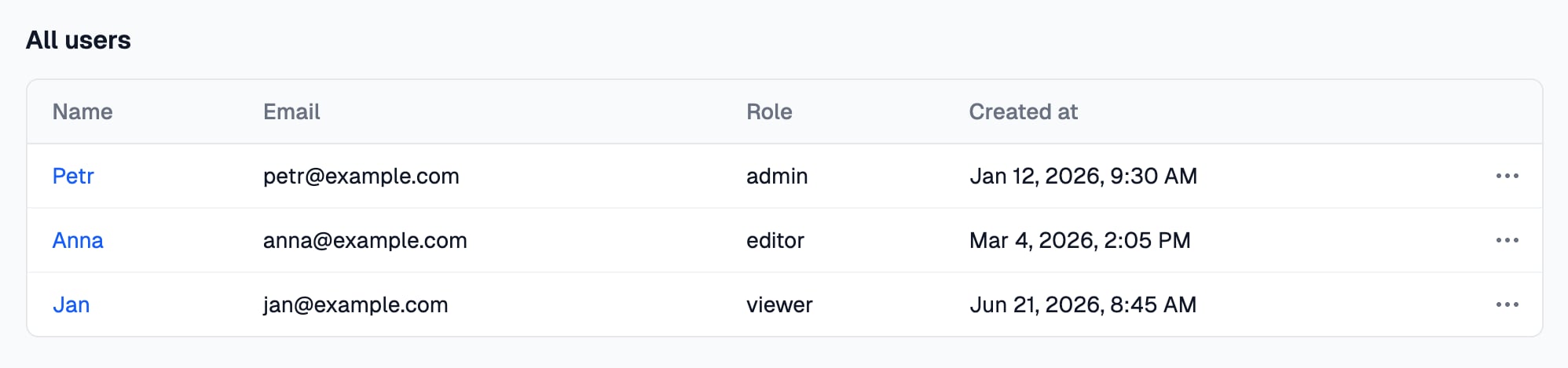
io.display.table() shows records as a table in a folder’s page or in a step of an action. It only displays and returns nothing. Provided by the @awaitio/display-table package.
Install
Setup
Register it under the key you want inio:
app.ts
Usage
null for none.
Props
Filtering and paging happen in the browser, on the rows the page sent: send the rows people need, not the whole table.
Links to actions
A column withroute turns its cells into links, and every rowMenu item is one. Get them from the action they open with action.route(), the same routes ctx.redirect() takes; a menu item shows the route’s label, the action’s name unless you pass one.
{key} in a param is replaced by that key of the row, so a link can carry an id that is not shown as a column:
route() takes '{id}' even where the action’s schema wants a number, z.coerce.number(): the link carries text either way, and the action’s schema turns it into a number when the link is opened.
A menu per row
When the menu depends on the row, pass a function instead of the array. It gets each row and returns that row’s links; an empty array leaves the row without the … menu:- The function runs on the server, once per row, and the browser gets only the finished menus.
- It takes the values straight from
row, so{key}templates in the links it returns are not replaced. rowis aRecord<string, unknown>: turn a value into text withString(row.id)for a param.- A function that throws, or returns something that is not a link, fails like any other props that do not fit: the page shows an error, and an action fails at that step.
How values look
Dates read like Oct 16, 2026, 9:30 AM (aDate from the database arrives as an ISO string and is formatted too), numbers get thousands separators, true and false read Yes and No, an empty value N/A and an object its JSON.